
CartFlows Suite: What's Inside

All 4 Plugins. Every Feature.

The only difference between plans is the number of sites you can use them on.

Everything Included in the Suite:

CartFlows logo
CartFlows Pro

Funnels, flexible checkout layouts, order bumps, one-click upsells & downsells, A/B split testing.

Cart Abandonment Recovery

Email, SMS & WhatsApp sequences, product-level reports, discounts in recovery emails.

Modern Cart

Slide-out/popup cart, in-cart upsells, one-click payments for returning customers

pwc logo 1
Power Coupons

Auto-apply discounts, BOGO & loyalty rewards, dynamic coupon rules

Key Features across all plans:

A/B split testing on funnels
One-click upsells & downsells
Dynamic order bumps at checkout
Smart funnel routing
Email/SMS/WhatsApp recovery channels
Coupon incentives in recovery emails
Powerful coupon/discount features
Slide-out cart/popup cart styles
In-cart upsell recommendations
1,000+ app integrations with OttoKit
Single API key across all 4 plugins
$199
per year
Save $100

Everything Included in the Suite:

CartFlows logo
CartFlows Pro

Funnels, flexible checkout layouts, order bumps, one-click upsells & downsells, A/B split testing.

Cart Abandonment Recovery

Email, SMS & WhatsApp sequences, product-level reports, discounts in recovery emails.

Modern Cart

Slide-out/popup cart, in-cart upsells, one-click payments for returning customers

pwc logo 1
Power Coupons

Auto-apply discounts, BOGO & loyalty rewards, dynamic coupon rules

Key Features across all plans:

A/B split testing on funnels
One-click upsells & downsells
Dynamic order bumps at checkout
Smart funnel routing
Email/SMS/WhatsApp recovery channels
Coupon incentives in recovery emails
Powerful coupon/discount features
Slide-out cart/popup cart styles
In-cart upsell recommendations
1,000+ app integrations with OttoKit
Single API key across all 4 plugins
$299
per year
Save $130

Everything Included in the Suite:

CartFlows logo
CartFlows Pro

Funnels, flexible checkout layouts, order bumps, one-click upsells & downsells, A/B split testing.

Cart Abandonment Recovery

Email, SMS & WhatsApp sequences, product-level reports, discounts in recovery emails.

Modern Cart

Slide-out/popup cart, in-cart upsells, one-click payments for returning customers

pwc logo 1
Power Coupons

Auto-apply discounts, BOGO & loyalty rewards, dynamic coupon rules

Key Features across all plans:

A/B split testing on funnels
One-click upsells & downsells
Dynamic order bumps at checkout
Smart funnel routing
Email/SMS/WhatsApp recovery channels
Coupon incentives in recovery emails
Powerful coupon/discount features
Slide-out cart/popup cart styles
In-cart upsell recommendations
1,000+ app integrations with OttoKit
Single API key across all 4 plugins
$449
per year
Save $150
Smart Rule Engine

Recover More Abandoned Carts by Sending the Right Offer for Every Cart

Set conditions for your WooCommerce abandoned cart emails based on cart value, product and category. Set it up in minutes inside WordPress, no code needed.

How WooCommerce Abandoned Cart Email Rules Work

No code, no third-party tools. Set up conditional recovery emails right inside WordPress.

step icon 1 open template

Open Your Template

Go to Cart Abandonment Recovery and create or edit a follow-up email template.

step icon 2 enable conditions

Enable Dynamic Conditions

Toggle on the Dynamic Conditions switch. The visual rule builder appears instantly.

step icon 3 build rules

Build Your Rules

Pick conditions, set operators, enter values. Combine with AND/OR logic for precise targeting.

step icon 4 save recover

Save & Recover

Save your template. The rule engine evaluates every condition at send time automatically.
Features Built to Recover More Revenue

Every condition you need to match the right email to the right abandoned cart, with no guesswork.

feature cart value

Match the Email to the Cart Value

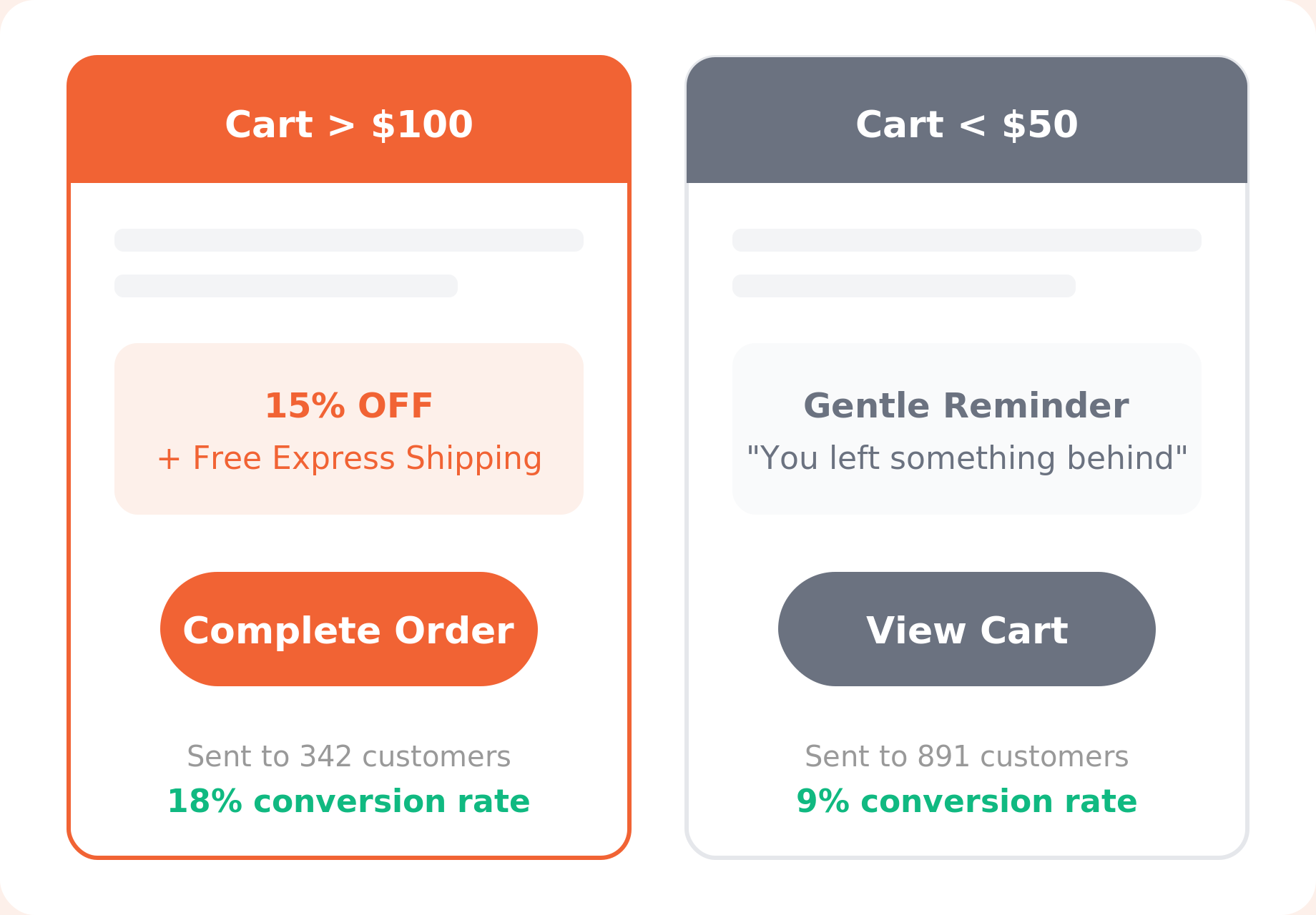
Set a cart-total threshold and create separate templates for different price tiers. A customer who left $300 worth of products deserves a more compelling offer than someone who abandoned a $15 item. Match the incentive to the value at stake.

Send Emails Based on What's in the Cart

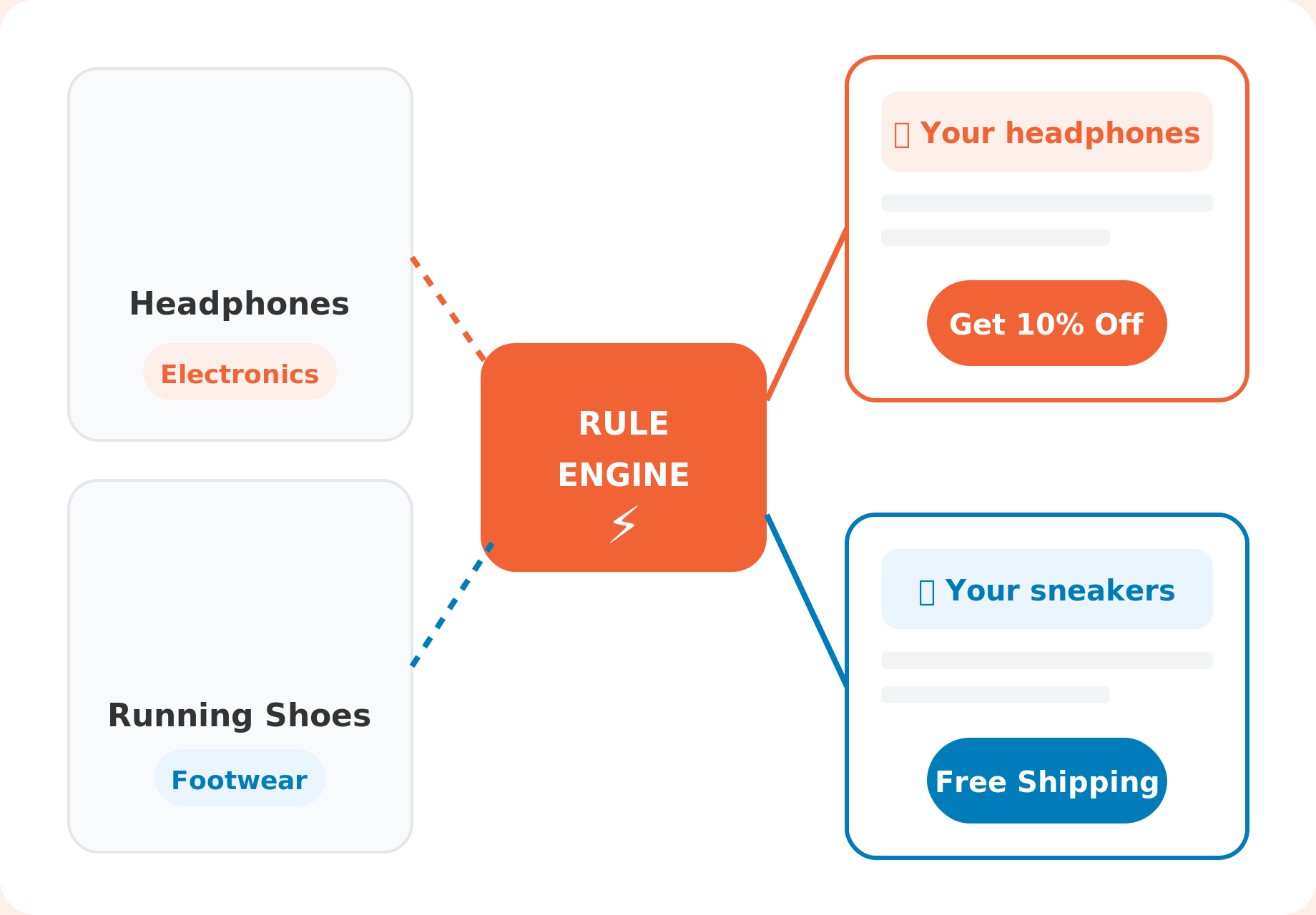
Target by specific product or product category. Mention the exact item they left behind, or run a category-wide campaign for your best-selling line. An email about "your Bluetooth headphones" converts better than "your items."

feature product targeting
feature geographic

Personalize by Billing Country

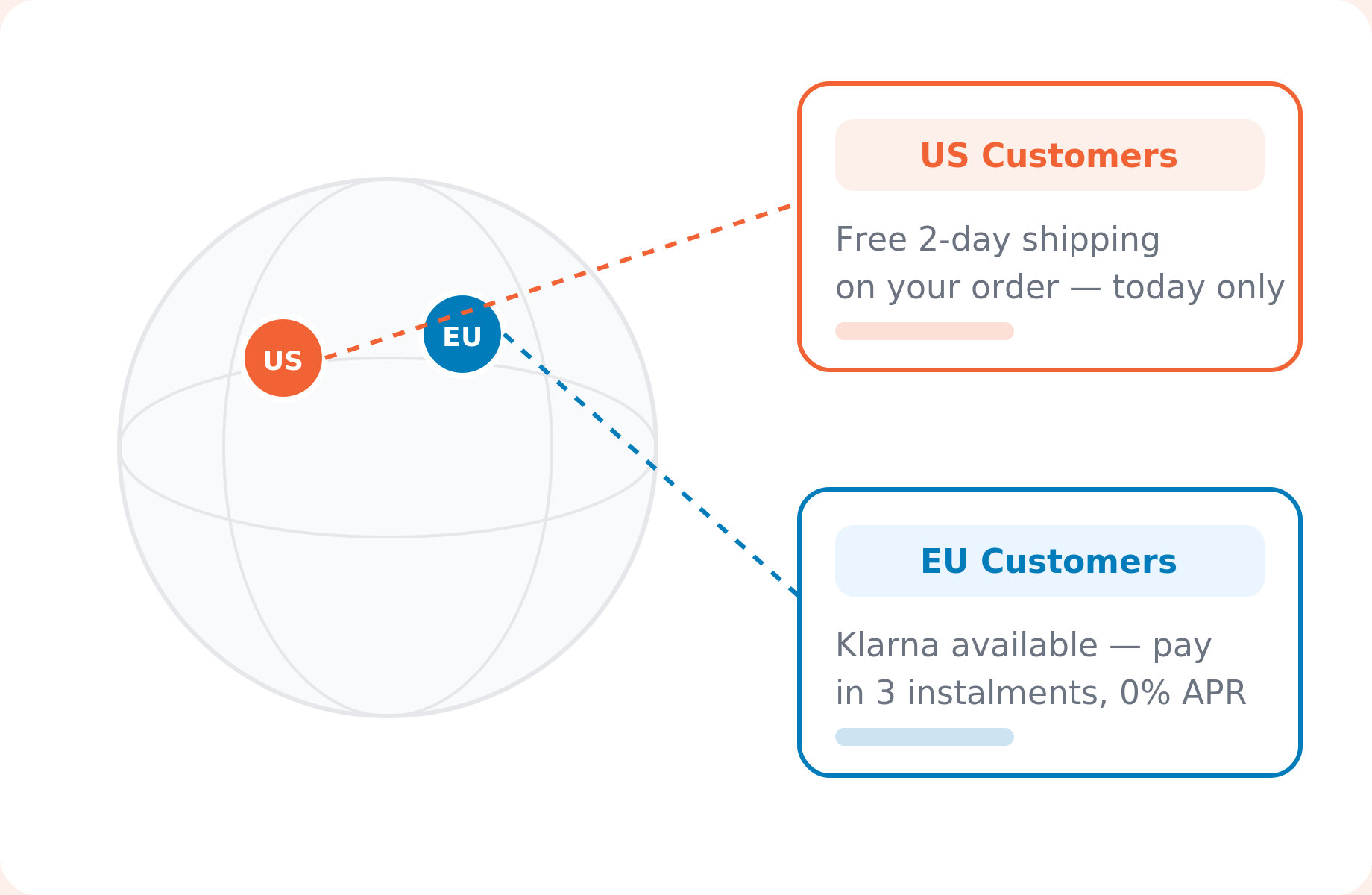
Use billing country as a condition to send region-specific offers. Promote free shipping for US customers, local payment methods for European buyers, or currency-specific messaging — all from one recovery workflow.

Five Conditions, Unlimited Cart Recovery Combinations

Each condition supports numeric, text, and list operators. Combine them with AND/OR logic to build rules as simple or complex as your campaigns need.

💰 Cart Total

📦 Product

🏷️ Product Category

📍 Billing Country

🛒 Number of Cart Items

Abandoned Cart Email Rules Your Store Can Use Today

Real-world setups that take minutes to configure.

VIP Recovery for High-Value Carts

Cart total greater than $200 triggers a premium email with a personal discount code and free express shipping.

US-Only Free Shipping Offer

Billing country equals "US" activates a recovery email promoting free 2-day shipping — only for US addresses.

Seasonal Category Push

Category equals "Winter Wear" AND cart total greater than $75 sends a seasonal campaign with a holiday discount.

Electronics-Only Campaign

Product category equals "Electronics" sends an email highlighting warranty info and a time-limited bundle deal.

Multi-Item Cart Nudge

Number of items greater than 3 sends a "Your items are selling fast" urgency email with social proof.

Developer-Extended Custom Rules

Use the wcar_get_cart_value_for_condition filter to add any custom condition your store needs.

Common Questions

Do you have any questions? See the list for our most frequently asked questions. If your questions is not listed here, then please contact us.

Yes. Dynamic Email Rules are available in Cart Abandonment Recovery Pro. The free version supports standard follow-up emails, but conditional targeting requires Pro.

The email is not sent. It gets marked as “rule-blocked” in the email history so you can review and adjust your conditions.

Yes. Add as many rule groups as you need. Groups are connected with OR logic, so the email sends if any group’s conditions are fully met.

Absolutely. Rules can be updated at any time from the template editor. Changes take effect immediately for future sends.

Yes. Developers can extend the rule engine using the wcar_get_cart_value_for_condition filter to add conditions specific to your store.

Use test emails from the template editor, check the email history for “rule-blocked” status entries, or create a simple test rule with known cart data to verify behavior.

Stop Losing Revenue to Abandoned Carts

Cart Abandonment Recovery Pro reaches customers where they are – email, SMS, and WhatsApp. With the right offer at the right time.
14-Day Money-Back Guarantee  |  Cancel Anytime

Download is Just A Click Away!

Enter your email address and be the first to learn about updates and new features.

This field is required.

Smart Rule Engine

Recover More Abandoned Carts by Sending the Right Offer for Every Cart

Set conditions for your WooCommerce abandoned cart emails based on cart value, product and category. Set it up in minutes inside WordPress, no code needed.

How WooCommerce Abandoned Cart Email Rules Work

No code, no third-party tools. Set up conditional recovery emails right inside WordPress.

step icon 1 open template

Open Your Template

Go to Cart Abandonment Recovery and create or edit a follow-up email template.

step icon 2 enable conditions

Enable Dynamic Conditions

Toggle on the Dynamic Conditions switch. The visual rule builder appears instantly.

step icon 3 build rules

Build Your Rules

Pick conditions, set operators, enter values. Combine with AND/OR logic for precise targeting.

step icon 4 save recover

Save & Recover

Save your template. The rule engine evaluates every condition at send time automatically.
Features Built to Recover More Revenue

Every condition you need to match the right email to the right abandoned cart, with no guesswork.

feature cart value

Match the Email to the Cart Value

Set a cart-total threshold and create separate templates for different price tiers. A customer who left $300 worth of products deserves a more compelling offer than someone who abandoned a $15 item. Match the incentive to the value at stake.

Send Emails Based on What's in the Cart

Target by specific product or product category. Mention the exact item they left behind, or run a category-wide campaign for your best-selling line. An email about "your Bluetooth headphones" converts better than "your items."

feature product targeting
feature geographic

Personalize by Billing Country

Use billing country as a condition to send region-specific offers. Promote free shipping for US customers, local payment methods for European buyers, or currency-specific messaging — all from one recovery workflow.

Five Conditions, Unlimited Cart Recovery Combinations

Each condition supports numeric, text, and list operators. Combine them with AND/OR logic to build rules as simple or complex as your campaigns need.

💰 Cart Total

📦 Product

🏷️ Product Category

📍 Billing Country

🛒 Number of Cart Items

Abandoned Cart Email Rules Your Store Can Use Today

Real-world setups that take minutes to configure.

VIP Recovery for High-Value Carts

Cart total greater than $200 triggers a premium email with a personal discount code and free express shipping.

US-Only Free Shipping Offer

Billing country equals "US" activates a recovery email promoting free 2-day shipping — only for US addresses.

Seasonal Category Push

Category equals "Winter Wear" AND cart total greater than $75 sends a seasonal campaign with a holiday discount.

Electronics-Only Campaign

Product category equals "Electronics" sends an email highlighting warranty info and a time-limited bundle deal.

Multi-Item Cart Nudge

Number of items greater than 3 sends a "Your items are selling fast" urgency email with social proof.

Developer-Extended Custom Rules

Use the wcar_get_cart_value_for_condition filter to add any custom condition your store needs.

Common Questions

Do you have any questions? See the list for our most frequently asked questions. If your questions is not listed here, then please contact us.

Yes. Dynamic Email Rules are available in Cart Abandonment Recovery Pro. The free version supports standard follow-up emails, but conditional targeting requires Pro.

The email is not sent. It gets marked as “rule-blocked” in the email history so you can review and adjust your conditions.

Yes. Add as many rule groups as you need. Groups are connected with OR logic, so the email sends if any group’s conditions are fully met.

Absolutely. Rules can be updated at any time from the template editor. Changes take effect immediately for future sends.

Yes. Developers can extend the rule engine using the wcar_get_cart_value_for_condition filter to add conditions specific to your store.

Use test emails from the template editor, check the email history for “rule-blocked” status entries, or create a simple test rule with known cart data to verify behavior.

Stop Losing Revenue to Abandoned Carts

Cart Abandonment Recovery Pro reaches customers where they are – email, SMS, and WhatsApp. With the right offer at the right time.
14-Day Money-Back Guarantee  |  Cancel Anytime