



CartFlows Suite: What's Inside

All 4 Plugins. Every Feature.

The only difference between plans is the number of sites you can use them on.

Everything Included in the Suite:

CartFlows logo
CartFlows Pro

Funnels, flexible checkout layouts, order bumps, one-click upsells & downsells, A/B split testing.

Cart Abandonment Recovery

Email, SMS & WhatsApp sequences, product-level reports, discounts in recovery emails.

Modern Cart

Slide-out/popup cart, in-cart upsells, one-click payments for returning customers

pwc logo 1
Power Coupons

Auto-apply discounts, BOGO & loyalty rewards, dynamic coupon rules

Key Features across all plans:

A/B split testing on funnels
One-click upsells & downsells
Dynamic order bumps at checkout
Smart funnel routing
Email/SMS/WhatsApp recovery channels
Coupon incentives in recovery emails
Powerful coupon/discount features
Slide-out cart/popup cart styles
In-cart upsell recommendations
1,000+ app integrations with OttoKit
Single API key across all 4 plugins
$199
per year
Save $100

Everything Included in the Suite:

CartFlows logo
CartFlows Pro

Funnels, flexible checkout layouts, order bumps, one-click upsells & downsells, A/B split testing.

Cart Abandonment Recovery

Email, SMS & WhatsApp sequences, product-level reports, discounts in recovery emails.

Modern Cart

Slide-out/popup cart, in-cart upsells, one-click payments for returning customers

pwc logo 1
Power Coupons

Auto-apply discounts, BOGO & loyalty rewards, dynamic coupon rules

Key Features across all plans:

A/B split testing on funnels
One-click upsells & downsells
Dynamic order bumps at checkout
Smart funnel routing
Email/SMS/WhatsApp recovery channels
Coupon incentives in recovery emails
Powerful coupon/discount features
Slide-out cart/popup cart styles
In-cart upsell recommendations
1,000+ app integrations with OttoKit
Single API key across all 4 plugins
$299
per year
Save $130

Everything Included in the Suite:

CartFlows logo
CartFlows Pro

Funnels, flexible checkout layouts, order bumps, one-click upsells & downsells, A/B split testing.

Cart Abandonment Recovery

Email, SMS & WhatsApp sequences, product-level reports, discounts in recovery emails.

Modern Cart

Slide-out/popup cart, in-cart upsells, one-click payments for returning customers

pwc logo 1
Power Coupons

Auto-apply discounts, BOGO & loyalty rewards, dynamic coupon rules

Key Features across all plans:

A/B split testing on funnels
One-click upsells & downsells
Dynamic order bumps at checkout
Smart funnel routing
Email/SMS/WhatsApp recovery channels
Coupon incentives in recovery emails
Powerful coupon/discount features
Slide-out cart/popup cart styles
In-cart upsell recommendations
1,000+ app integrations with OttoKit
Single API key across all 4 plugins
$449
per year
Save $150

Free WooCommerce Promotion Playbook

Get 7 proven promotion campaigns that boost sales while protecting your margins.

This field is required.

Download is Just A Click Away!

Enter your email address and be the first to learn about updates and new features.

This field is required.

Introducing Field Control – Visibility, Order, Layouts

Quick Summary Want more control over your WooCommerce checkout? CartFlows now lets you show, hide, and reorder fields and create beautiful three-column layouts. It’s faster, easier, and built to convert. Read the full guide and start customizing your checkout with Field Control.
Modify Your Checkout Form Just With a Click!

Have you ever wanted complete point-and-click control over your sales funnel checkout form?

Your checkout form is one of the most crucial parts of your sales funnels.

We at CartFlows, understand how a point-and-click control over your checkout form will provide so much ease of use.

There are hundreds of plugins offering easy-to-activate checkout forms, but finding a truly customizable one remains to be a challenge.

This is why CartFlows Pro Field Control is a game-changer. Now you can effortlessly modify your checkout form with a simple click of your mouse. This can bring your customer’s e-commerce experience to a whole new level.

Introducing Field Control

Field Control is a new feature given to all CartFlows Pro users. It allows you to arrange, edit, layout and change almost every part of your checkout form in easy steps.

Steps in Editing Your Checkout Form

To use Field Control, you need to download and activate CartFlows in WordPress. Once activated, you can start editing your checkout form by clicking on Checkout Fields and ticking on the Enable Custom Field Editor.
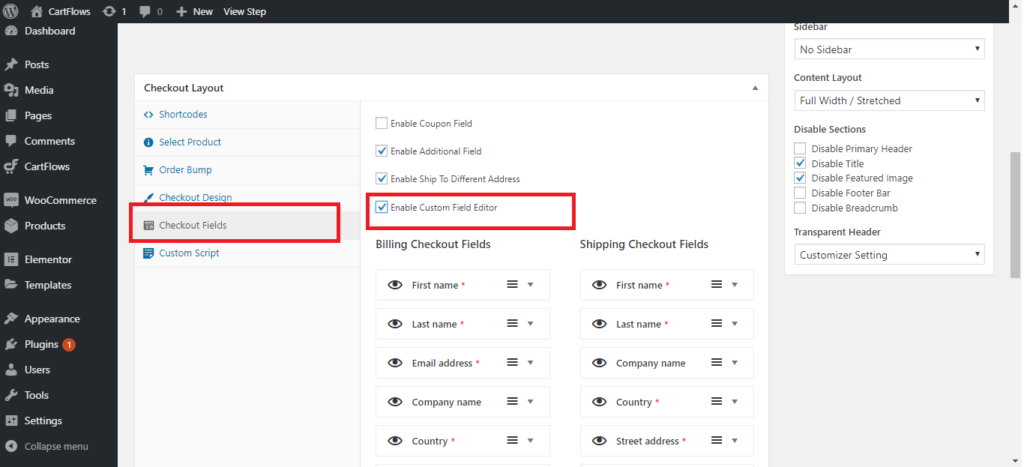
Field Control1 1024x467

You will be given a list of items that you can customize in the Billing Checkout Fields as well as in the Shipping Checkout Fields.

Field Control comes in an easy drag-and-drop option, so you can lay out the checkout form in any order that you want. You also have control over what your customers see, the items that they are required to fill out, and ultimately the look and feel of your checkout form.

In Woocommerce, the email address field usually comes at the end part. If you are like some of the business owners that we know, you’d love to get client’s information first.

The ability to rearrange the fields will give you total control of your checkout form. With the drag-and-drop option, you can now easily change the fields. This allows you to get the most important information first.
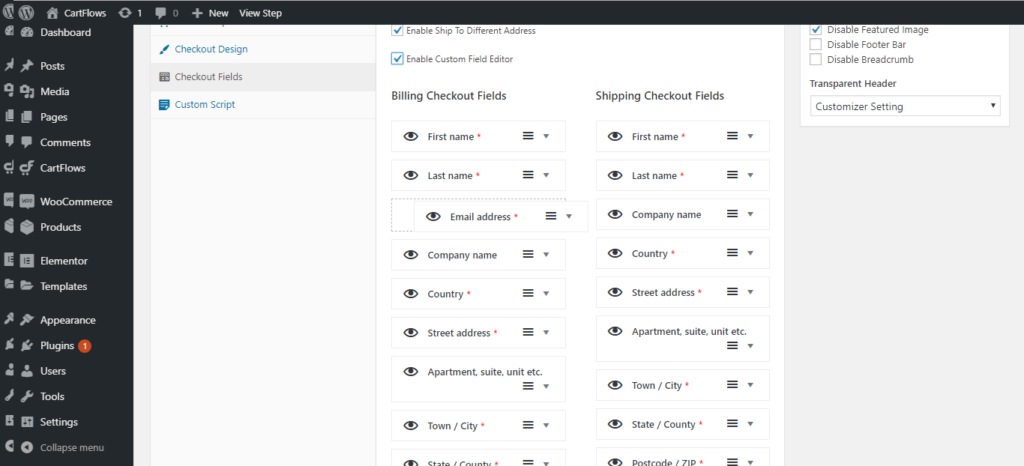
Field Control2 1024x466

Unique Editing Features

Customizable Individual Fields

If you click on the drop-down button, you can also see a range of other customizable options to make your fields even more tailor-fitted to the service or product you offer.
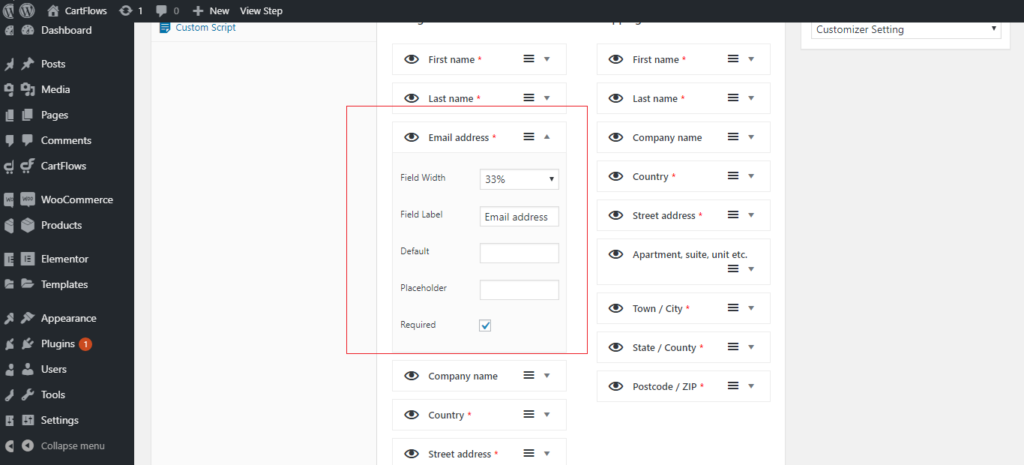
Field Control3 1024x465

You can now change information such as the Field Width, Field Labels, Default Value, the Place Holder and if you want the field to be required or not. 

Three Columns in A Row

Field Control allows you to edit up to three columns in your checkout form. So if you want to get three columns in a single row, you just need to choose 33% on three succeeding fields and they will all go in a single line once published.

Choose the Fields That You Want to Show

CartFlows Field Control will also allow you to pick only the fields that matter. For some businesses, some information like Company Name is no longer necessary so you can take this out by simply turning off its visibility.
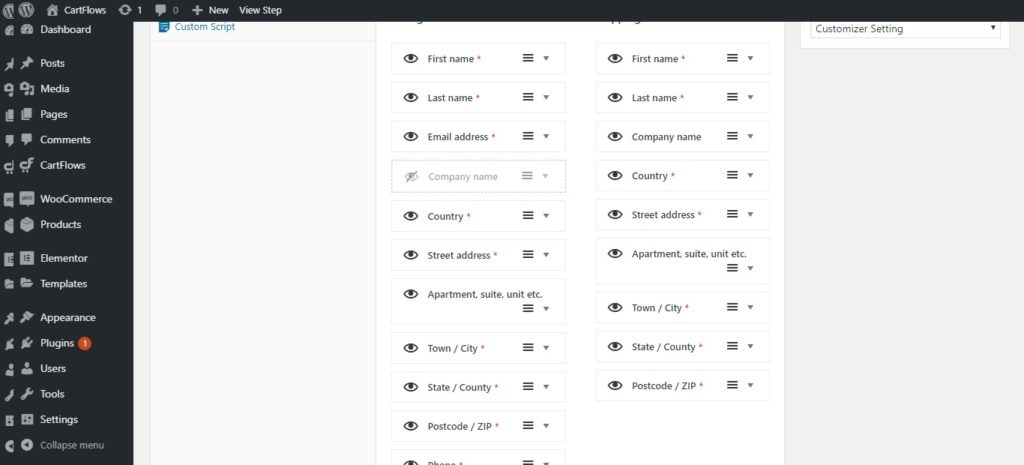
Field Control4 1024x465

Field Control allows you to have total control and management of your customer’s e-commerce experience. It offers easy-to-use features that any WordPress beginner will find easy to use.

For more information on how CartFlows Field Control can be edited, check out this video:

Ready to Maximize Store Conversions?

Supercharge your store’s sales with CartFlows Pro. Increase conversions, boost profits, and grow your business with minimal effort.

Optimize profits with minimal risk with a 14-day money-back guarantee.

Join 69,365 Subscribers

Get exclusive access to new tips, articles, guides, updates, and more.
Single Blog Subscription Form

Try CartFlows Suite Risk-Free for 14 Days

You are protected by our no questions asked refund policy.
Like what you read? Leave a comment