
CartFlows Suite: What's Inside

All 4 Plugins. Every Feature.

The only difference between plans is the number of sites you can use them on.

Everything Included in the Suite:

CartFlows logo
CartFlows Pro

Funnels, flexible checkout layouts, order bumps, one-click upsells & downsells, A/B split testing.

Cart Abandonment Recovery

Email, SMS & WhatsApp sequences, product-level reports, discounts in recovery emails.

Modern Cart

Slide-out/popup cart, in-cart upsells, one-click payments for returning customers

pwc logo 1
Power Coupons

Auto-apply discounts, BOGO & loyalty rewards, dynamic coupon rules

Key Features across all plans:

A/B split testing on funnels
One-click upsells & downsells
Dynamic order bumps at checkout
Smart funnel routing
Email/SMS/WhatsApp recovery channels
Coupon incentives in recovery emails
Powerful coupon/discount features
Slide-out cart/popup cart styles
In-cart upsell recommendations
1,000+ app integrations with OttoKit
Single API key across all 4 plugins
$199
per year
Save $100

Everything Included in the Suite:

CartFlows logo
CartFlows Pro

Funnels, flexible checkout layouts, order bumps, one-click upsells & downsells, A/B split testing.

Cart Abandonment Recovery

Email, SMS & WhatsApp sequences, product-level reports, discounts in recovery emails.

Modern Cart

Slide-out/popup cart, in-cart upsells, one-click payments for returning customers

pwc logo 1
Power Coupons

Auto-apply discounts, BOGO & loyalty rewards, dynamic coupon rules

Key Features across all plans:

A/B split testing on funnels
One-click upsells & downsells
Dynamic order bumps at checkout
Smart funnel routing
Email/SMS/WhatsApp recovery channels
Coupon incentives in recovery emails
Powerful coupon/discount features
Slide-out cart/popup cart styles
In-cart upsell recommendations
1,000+ app integrations with OttoKit
Single API key across all 4 plugins
$299
per year
Save $130

Everything Included in the Suite:

CartFlows logo
CartFlows Pro

Funnels, flexible checkout layouts, order bumps, one-click upsells & downsells, A/B split testing.

Cart Abandonment Recovery

Email, SMS & WhatsApp sequences, product-level reports, discounts in recovery emails.

Modern Cart

Slide-out/popup cart, in-cart upsells, one-click payments for returning customers

pwc logo 1
Power Coupons

Auto-apply discounts, BOGO & loyalty rewards, dynamic coupon rules

Key Features across all plans:

A/B split testing on funnels
One-click upsells & downsells
Dynamic order bumps at checkout
Smart funnel routing
Email/SMS/WhatsApp recovery channels
Coupon incentives in recovery emails
Powerful coupon/discount features
Slide-out cart/popup cart styles
In-cart upsell recommendations
1,000+ app integrations with OttoKit
Single API key across all 4 plugins
$449
per year
Save $150

Free WooCommerce Promotion Playbook

Get 7 proven promotion campaigns that boost sales while protecting your margins.

This field is required.

Download is Just A Click Away!

Enter your email address and be the first to learn about updates and new features.

This field is required.

Introducing Quantity And Variation Selector

Quick Summary Make buying easier with fewer clicks. CartFlows now lets shoppers choose product quantity and variations directly from the checkout, no extra steps and no friction. Faster decisions mean more sales. Read the full guide and enable this game-changing feature in just two clicks.
Sell More With Quantity Changer

The traditional checkout process of sending your buyer to a cart then the checkout does have some benefits, even though it lowers conversions by adding an unnecessary step.

Here at CartFlows, we want you to have total control over your customer’s shopping experience.

Here’s a common scenario: Someone enters your sales funnel trying to buy a box of healthy tea. They add a box to their cart and then go to the checkout page to complete the purchase. Along the way, they realized they wanted to get another box as a gift for their friends.

But here’s the kicker – they found out they can only adjust the quantity of their products in the cart, so they would need go back one page.

This traditional checkout process of sending your buyer to a cart then the checkout does have some benefits, even though it lowers conversions by adding an unnecessary step.

So at CartFlows we included a nice feature called Quantity and Variations Selector to allow you to enjoy the best of both worlds.

Enable Quantity and Variations Selector With Just Two Mouse Clicks

Now you can enable your buyers to have the opportunity to change the quantity and/or variation of their products right directly in the checkout page.

The best thing about it is that you can add or change this feature in just two mouse clicks.

How To Enable Your Quantity and Variations Selector

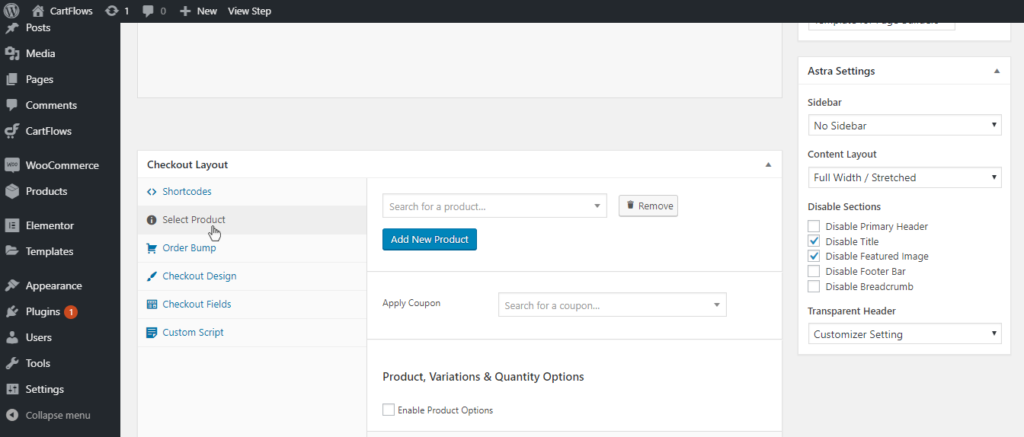
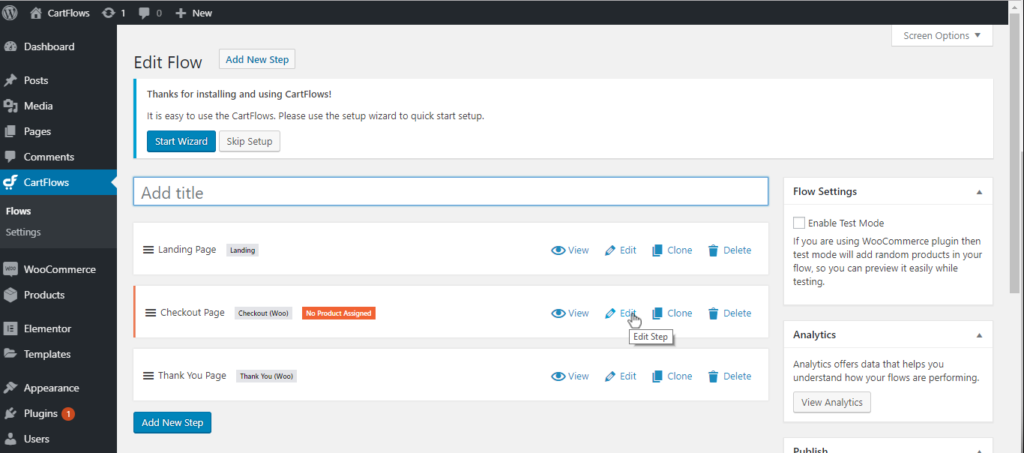
To enable this feature, you need to go to CartFlows and then click edit on the Checkout Page.
QandV1 1024x453
QandV2 1024x437

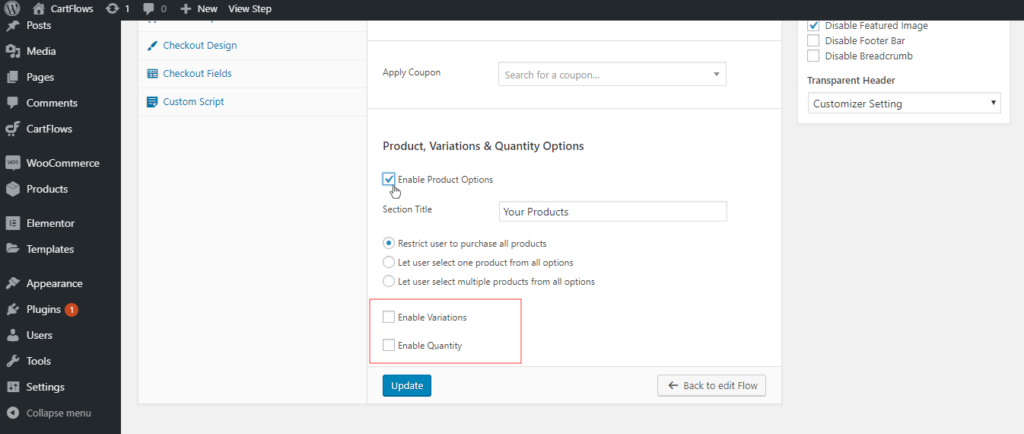
Checkout Layout > Product, Variations, & Quantity Options

You can opt to Enable Variations or Enable Quantity or even enable both options.
QandV3 1024x434

Finally, click on Update.

Refresh your checkout page and you will see that quantity and/or variations options can now be edited on the checkout page.

Quantity and Variations Selector is an amazing tool for e-commerce websites who are selling physical product sellers or event tickets. This option takes out unnecessary steps in the checkout process and will keep your customers ultimately happy. 

Ready to Maximize Store Conversions?

Supercharge your store’s sales with CartFlows Pro. Increase conversions, boost profits, and grow your business with minimal effort.

Optimize profits with minimal risk with a 14-day money-back guarantee.

Join 69,365 Subscribers

Get exclusive access to new tips, articles, guides, updates, and more.
Single Blog Subscription Form

Try CartFlows Suite Risk-Free for 14 Days

You are protected by our no questions asked refund policy.
Like what you read? Leave a comment